Panora: 641.755.2424 - Guthrie: 641.332.2000
  • Fiber Build
  • Advertise
  • Webmail
  • Bill Pay
  • Remote Support
Panora FiberPanora FiberPanora FiberPanora Fiber
  • Residential
    • Panora
    • Lake Panorama
    • Yale
    • Guthrie Center
    • Adel – Rural
    • Bagley
    • Bayard
    • Earlham – Rural
    • Jamaica
    • Linden
    • Redfield – Rural
    • Stuart – Rural
    • Winterset – Rural
    • Panora Assisted Living
    • Not Sure
  • Business
    • Panora
    • Lake Panorama
    • Yale
    • Guthrie Center
    • Adel – Rural
    • Bagley
    • Bayard
    • Earlham – Rural
    • Jamaica
    • Linden
    • Redfield – Rural
    • Stuart – Rural
    • Winterset – Rural
  • Support
  • Community
    • SmartTown
    • Events and Organizations
    • Scholarships and Grants
    • Economic Development
  • About Us
    • Board of Directors
    • Staff
    • Employment
  • Contact Us

Make the great outdoors even greater.

PHONE CONNECTION INSTRUCTIONS

Panora Fiber is proud to provide SmartTown™, a secure Wi-Fi option, to visitors.

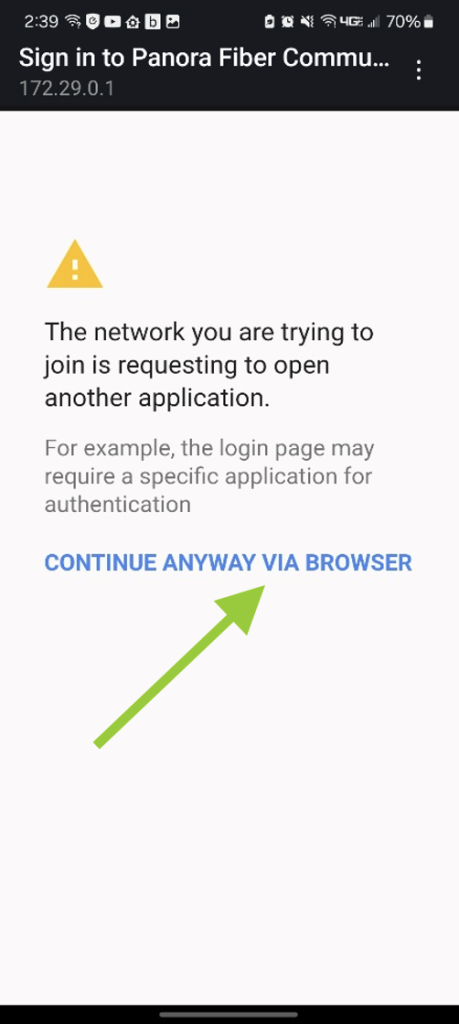
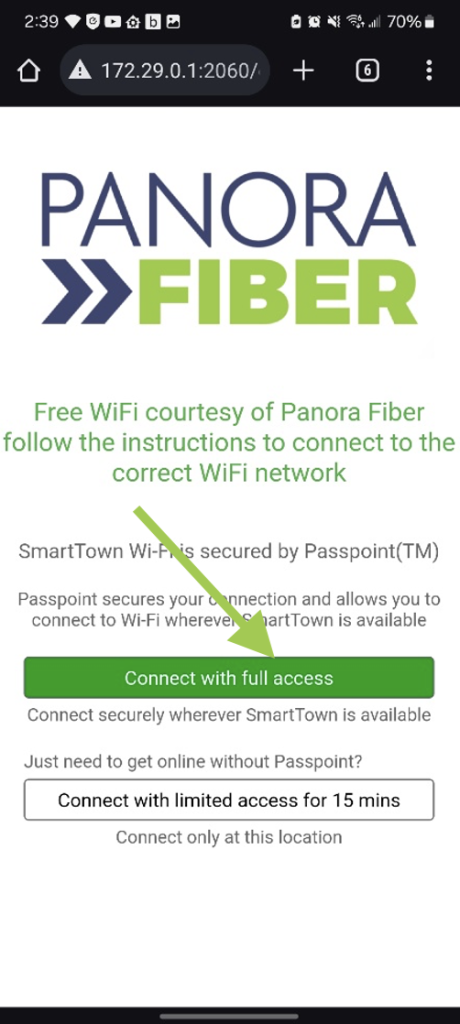
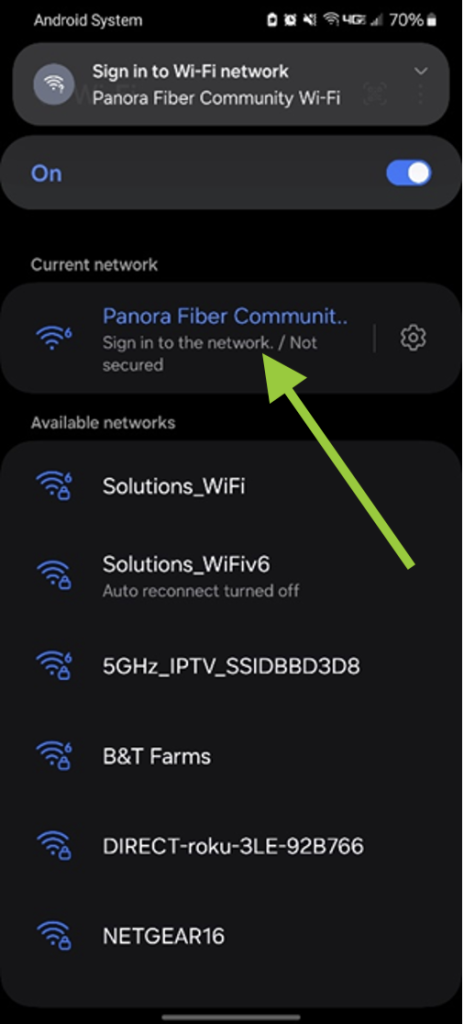
If you see a SmartTown sign, search your Wi-Fi networks for “Panora Fiber Community Wi-Fi” and connect to it with your device. Once you connect, you will be prompted with the following screen where you can setup full access or limited access. Full access is free and will provide roaming access to all of Panora Fiber’s SmartTown Wi-Fi networks.

The limited access is also free, but please note that use is limited to 15 minutes before users must then reconnect to the Wi-Fi network. The limited access will block access to the Internet after 15 minutes, but the user’s device does not drop the Wi-Fi connection. In this instance, if a limited user wanted to continue for another 15 minutes, they would need to disconnect from the Wi-Fi and then reconnect again through the same process.

Click images to expand.
STEP ONE

STEP TWO

STEP THREE

STEP FOUR

STEP FIVE

STEP SIX

STEP SEVEN

To connect with full access, click on “Connect with full access”

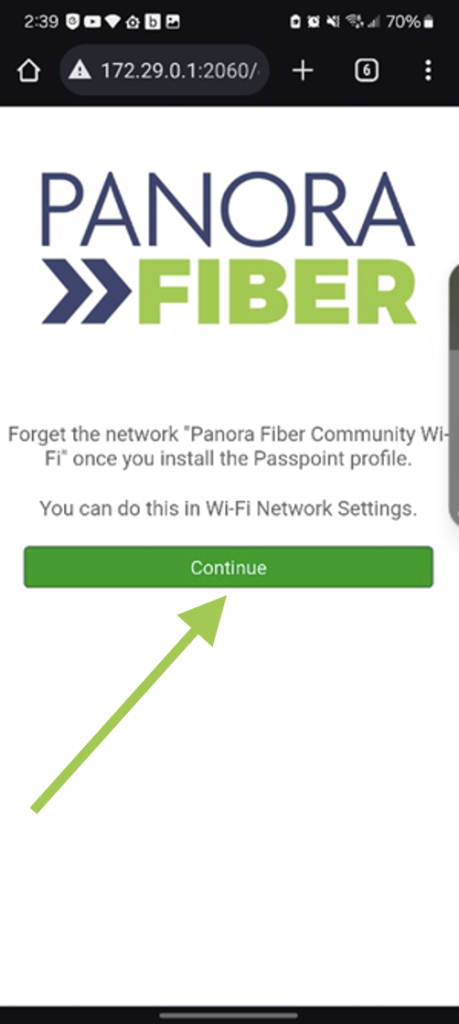
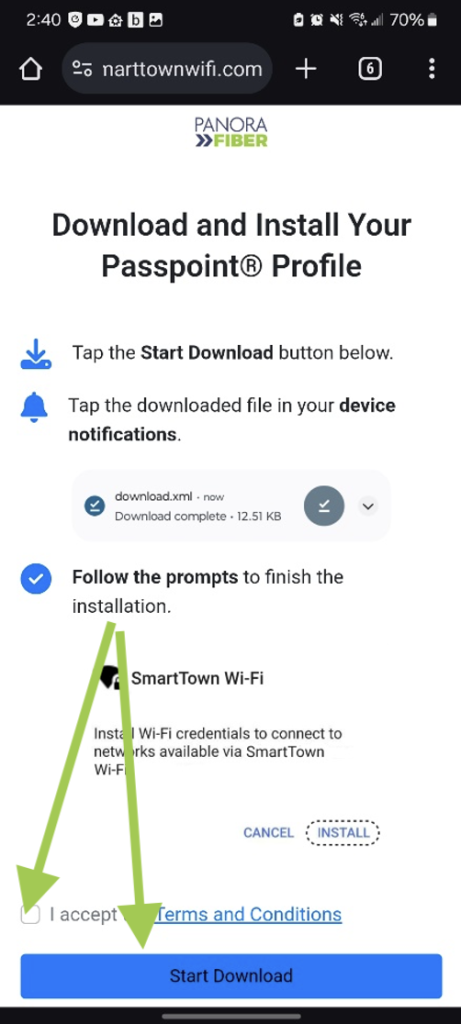
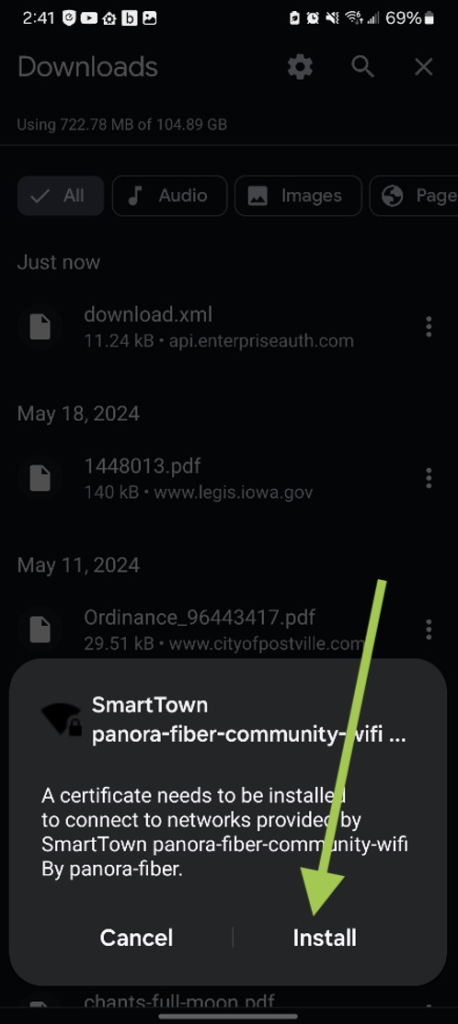
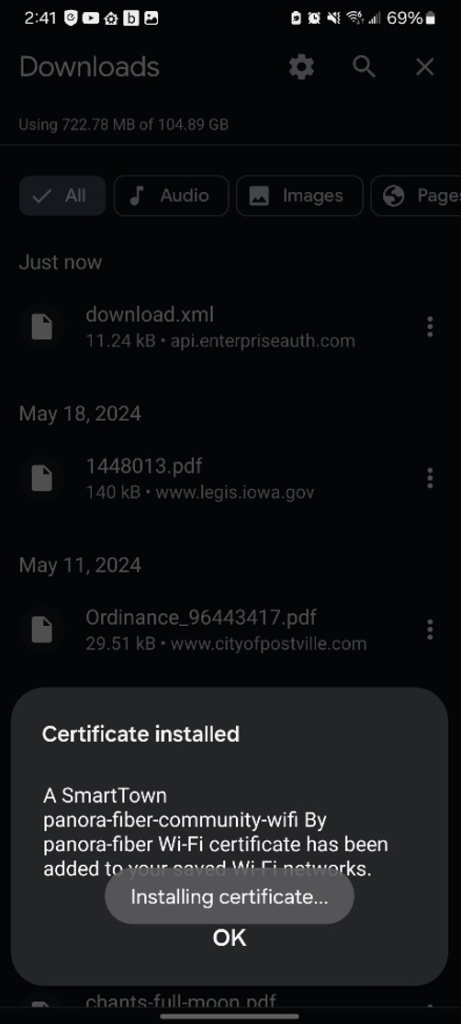
Once you click “Connect with full access,” you will be prompted to download a Passpoint Profile. If it doesn’t launch automatically, go to your Downloads and select the file “download.xml”. You will be prompted to install a SmartTown certificate. Select Install. You will then see a confirmation that the certificate was installed.

Note: Once you have completed full setup, you will want to go to your WiFi networks and “Forget” the “Panora Fiber Community Wi-Fi” network on your PC or electronic device.

PANORA OFFICE

114 East Main Street
Panora, IA 50216
641.755.2424
Hours: M–F 8:00 a.m. – 5:00 p.m.

GUTHRIE CENTER OFFICE

403 State Street
Guthrie Center, IA 50115
641.332.2000
Hours: M–F 8:00 a.m. – 5:00 p.m.
but closed 12:00 p.m. – 1:00 p.m. for lunch

Important Links

  • Permission to Bury Form
  • CPNI Form
  • Local Channel Ad
  • Letter of Agency
  • IP-Enabled 911 Services Disclosure
  • Customer Consent Form
Copyright 2025 Cornerstone Group | All Rights Reserved | Terms and Policies
  • Webmail
  • Bill Pay
  • Fiber Build
  • Advertise
  • Residential
    • Panora
    • Lake Panorama
    • Yale
    • Guthrie Center
    • Adel – Rural
    • Bagley
    • Bayard
    • Earlham – Rural
    • Jamaica
    • Linden
    • Redfield – Rural
    • Stuart – Rural
    • Winterset – Rural
    • Panora Assisted Living
    • Not Sure
  • Business
    • Panora
    • Lake Panorama
    • Yale
    • Guthrie Center
    • Adel – Rural
    • Bagley
    • Bayard
    • Earlham – Rural
    • Jamaica
    • Linden
    • Redfield – Rural
    • Stuart – Rural
    • Winterset – Rural
  • Support
  • Community
    • SmartTown
    • Events and Organizations
    • Scholarships and Grants
    • Economic Development
  • About Us
    • Board of Directors
    • Staff
    • Employment
  • Contact Us
Panora Fiber